Components
“Pin-Compatible” Isn’t “Drop-In”: How to Find and Verify a Replacement for a Discontinued Part
When a part goes obsolete, "pin-compatible" is the phrase that gets people into trouble. Whether a replacement actually works on your board depends on three separate things: form, fit, and function — and "pin-compatible" only guarantees two of them.
Last updated: July 11, 2026. The technical claims below are supported by linked manufacturer datasheets, application notes, and named industry sources. Read the specific part's datasheet before you commit.
The short version
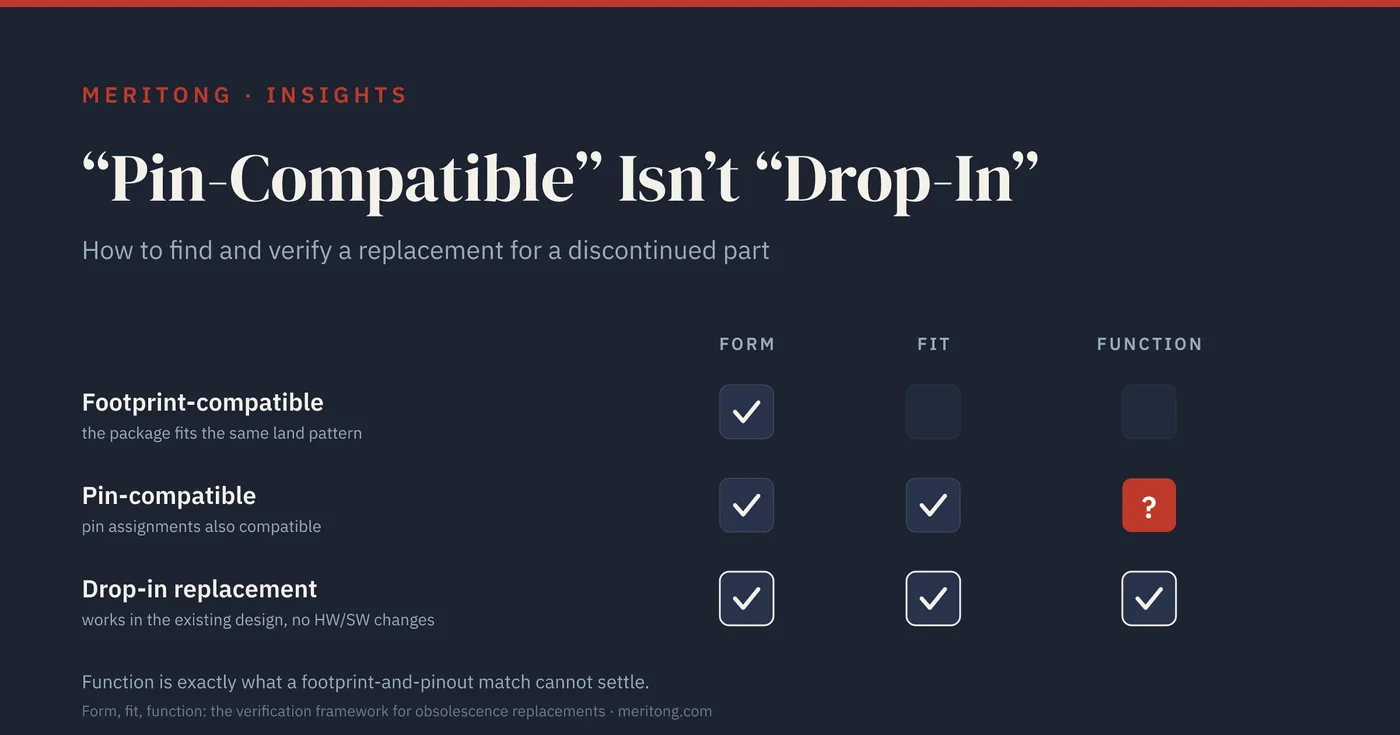
When a part goes obsolete, "pin-compatible" is the phrase that gets people into trouble. Whether a replacement actually works on your board depends on three separate properties: form, which is the physical package and land pattern; fit, which is the pinout and the pin assignments; and function, which is how the device behaves electrically. Footprint-compatible means that the package fits the same PCB land pattern, and that settles form. Pin-compatible means in addition that the corresponding pins have compatible assignments, and that settles fit. Neither term guarantees the third property, because function is exactly what a footprint-and-pinout match cannot settle.
Two propositions govern the verification problem, and together they explain why verifying a candidate takes so much longer than finding one. Form and fit are established by comparing two documents, whereas function is established only against the conditions of one particular design. A land pattern either matches or it does not, and a pin assignment either corresponds or it does not; both questions close on the page. Function stays open, because the same device behaves differently at a different voltage, a different temperature, a different load, or under a different configuration procedure. A catalog field records a value; the behavior that value produces under conditions is described in the prose, the curves, and the procedures of the datasheets and application notes.
Finding a candidate is the easy part, since manufacturers publish cross-reference tools and lifecycle databases suggest alternates. Verifying the candidate is the job, because the failures that survive to production hide in function: a ceramic capacitor that quietly loses capacitance under voltage, a regulator that oscillates because it wants a different output capacitor, a transistor with the same pins but a smaller safe operating area, a flash chip whose configuration bit is not where your boot code looks.
⚠ "Pin-compatible" ≠ "drop-in"
A pin-compatible part matches footprint and pin assignments. A true drop-in replacement must also work in the existing design, without hardware or software changes, across all relevant operating conditions: voltage, current, temperature, timing, and load. The four traps below are all cases in which the pins match perfectly while the function does not. Treat "pin-compatible" as a starting point. It is not a substitute for the verification that follows.
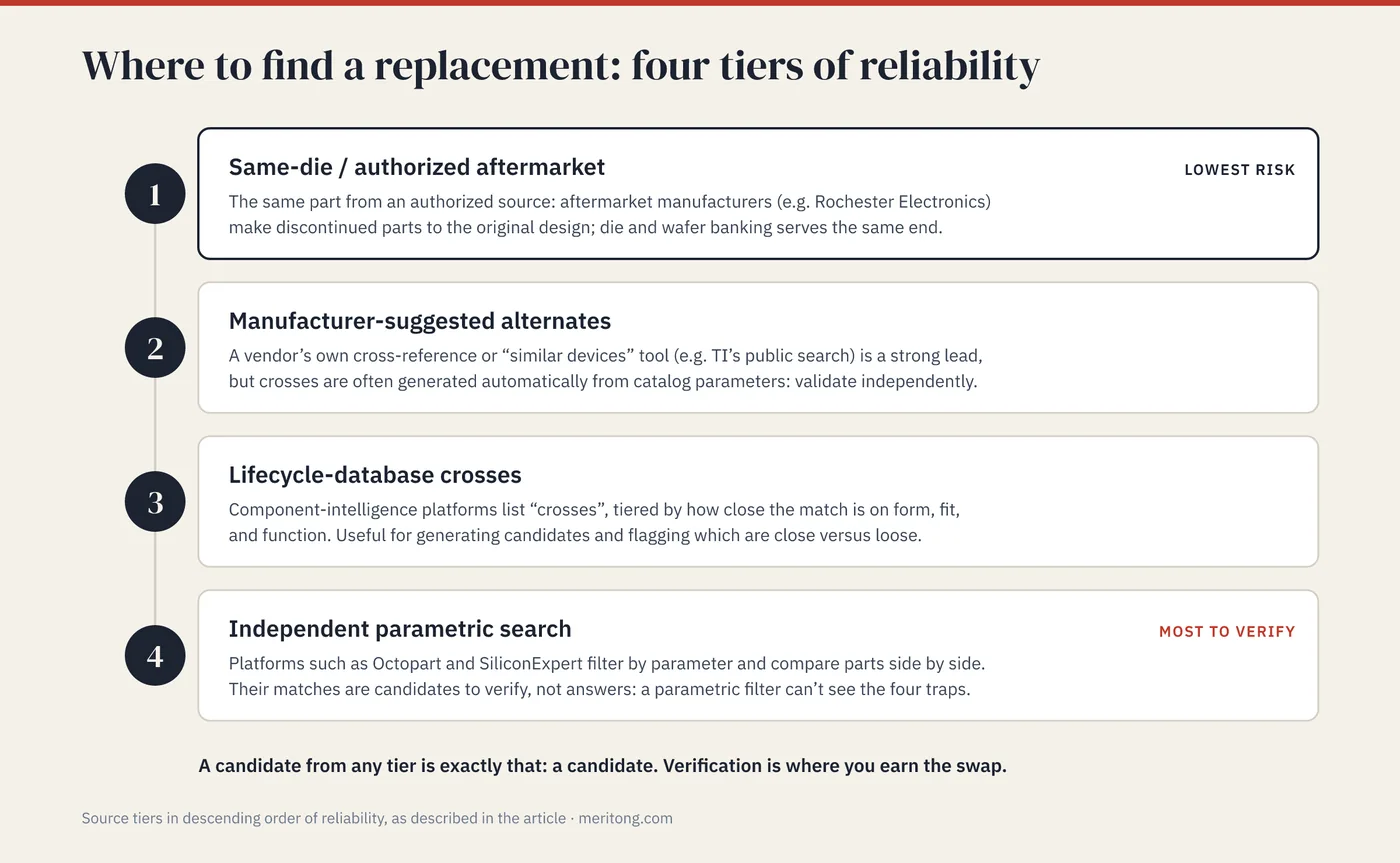
Step 1: Find candidates (in descending order of reliability)
Not all replacements are equally safe. Work down the list below, because the higher up you can stop, the less you have to prove.
Same-die / authorized aftermarket: the lowest-risk replacement is the same part from an authorized source. Authorized aftermarket manufacturers keep obsolete devices in production under license. Rochester Electronics, for example, states that it makes discontinued parts to the original design, using information transferred directly from the original component manufacturer (OCM). Die and wafer banking serves the same end. Where traceability to the OCM or its authorized manufacturer is unbroken, these are authorized same-part supply routes rather than parametric crosses, though program-, lot- or application-specific qualification requirements can still apply.
Manufacturer-suggested alternates: some manufacturers publish a cross-reference or "similar devices" tool. Texas Instruments, for instance, runs a public cross-reference search for finding equivalent parts. A vendor's own suggested alternate is a strong lead, yet cross-references are often generated automatically from catalog parameters, which is why you validate them independently.
Lifecycle-database crosses: some component-intelligence platforms provide "crosses" lists for many parts, tiered by how close the match is on form, fit, and function. Such lists are useful for generating candidates and for flagging which matches are close and which are loose.
Independent parametric / cross-reference search: platforms such as Octopart and SiliconExpert let you filter by parameter and compare parts side by side. Treat their matches as candidates for verification. A parametric filter compares the fields a catalog exposes, and the traps in the next section are outside those fields.
A candidate from any of these sources is exactly that: a candidate. The step that follows is where you earn the swap.
Step 2: Verify against the datasheet
Put the two datasheets side by side and walk the parameters that actually matter for your circuit. A difference that would break one design is immaterial in another, and only the design in front of you settles which is which. The table below is a minimum screening checklist, and the traps that follow it illustrate four recurring failure modes.
| Check | What to compare | What can go wrong |
|---|---|---|
| Pin mapping | Pin-for-pin assignments, polarity, unused/NC pins, exposed-pad connection | The same footprint can come with different pin assignments |
| Electrical envelope | Voltage rails, input/output thresholds, current limits, tolerance | A "same value" part can operate over a different range |
| Behavior under load | Capacitance vs. DC bias; regulator stability vs. output cap; transistor safe operating area | Nameplate value ≠ delivered value under real conditions |
| Timing & configuration | Clocking, startup, default register/config state | Boot and init code can assume vendor-specific behavior |
| Temperature grade | Operating range and derating at your worst-case temp | A commercial-grade swap can fail an industrial spec |
| Package & thermal | Body, thermal pad, thermal resistance | Same outline, different heat path |
| Re-test / requalification | Where-used criticality; automotive AEC-Q qualification | A swap in a certified/automotive product may need requalification |
That checklist establishes a floor. Depending on the part and the application, the full screen extends to absolute-maximum versus recommended operating conditions, guaranteed min/max versus typical values, power-up and power-down sequencing, transient and leakage behavior, moisture-sensitivity level and terminal finish for assembly, and any applicable qualification or change-control requirements.
As a rule of thumb, the more critical the part's role and the harsher your operating conditions, the more of this list you move from reading to measurement. In my own audits, the deltas that footprint-matching hides usually surface only on a line-by-line reading of both datasheets, including the original manufacturer's Chinese-language documentation, which is where the Chinese-market alternates actually describe their differences. That work is slow, and it is where a bad swap gets caught.
The four traps in detail
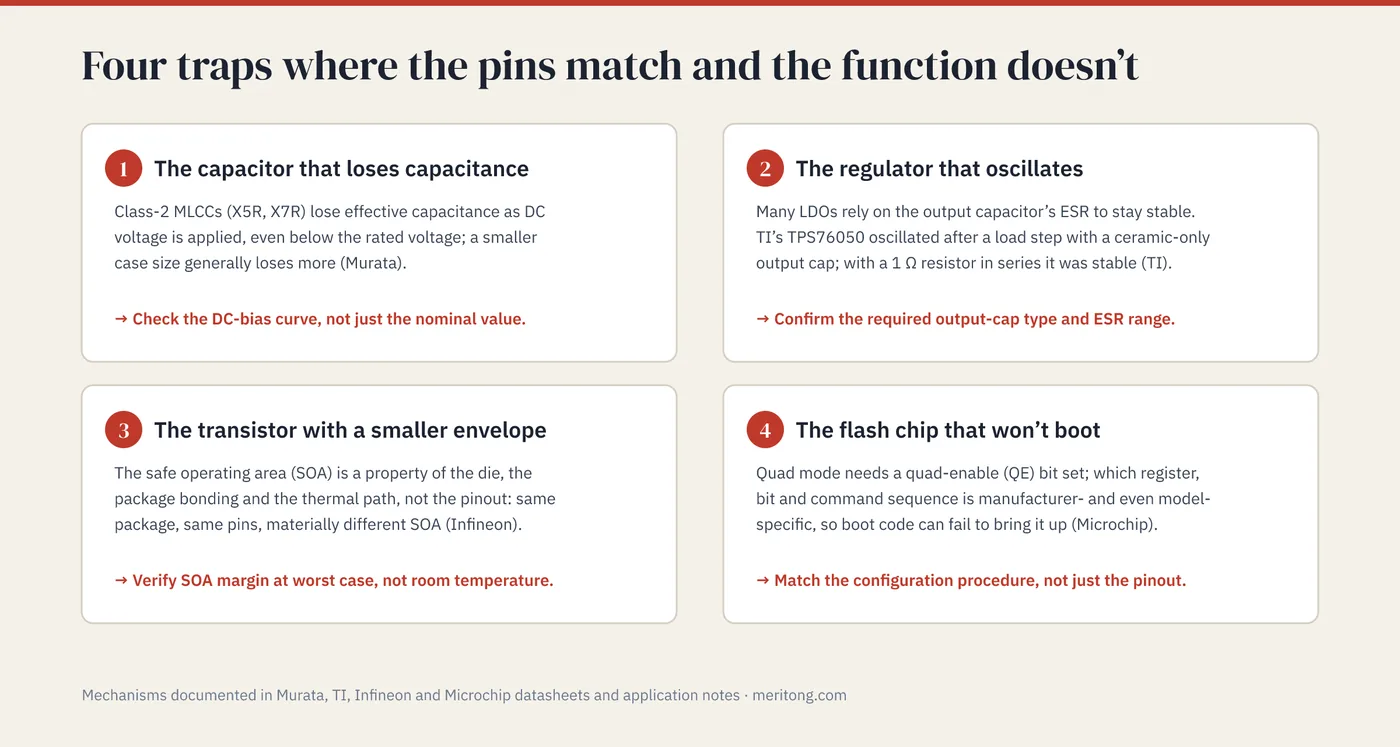
Each of the four is a case in which the pins match while the function does not. The mechanisms are documented in the manufacturers' own datasheets and application notes, and the point for a non-specialist is to know that these risks exist and to put the right questions to your engineers. The four differ in domain, covering dielectric behavior, loop stability, thermal capability, and firmware configuration, and they share one structure: the field a comparison table exposes agrees, while the property that decides the outcome is described somewhere the comparison never reached. That is how each of them survives to production.
1. The ceramic capacitor that loses its capacitance
Class-2 multilayer ceramic capacitors (MLCCs), the common X5R and X7R types, lose effective capacitance as DC voltage is applied. Murata's own documentation notes that the capacitance change "becomes larger as voltage increases, even if the applied voltage is below the rated voltage," and that a larger case size generally loses less than a smaller one at the same rating. A swap that keeps the nominal "10 µF" while changing the dielectric or the case size can therefore deliver noticeably less capacitance than nominal, precisely where your rail needs it.
A nameplate value and a delivered value are different quantities wherever the delivered one moves with the applied conditions, and here it moves with the applied voltage. Check the part's DC-bias curve. The nominal value alone does not settle the comparison.
2. The regulator that oscillates
Many low-dropout regulators (LDOs) rely on the output capacitor's equivalent series resistance (ESR) to stay stable, which, for those parts, makes the stability of that rail a property of the regulator and the capacitor together. Swap in a pin-compatible LDO tuned for a different capacitor type, and the control loop can ring or oscillate. Texas Instruments documents exactly this: a TPS76050 with only a ceramic output capacitor showed multiple oscillations after a load step, while the same regulator with a 1 Ω resistor added in series became stable. A "ceramic-stable" LDO and an "electrolytic-stable" LDO can share a footprint and still require completely different output capacitors.
A pin-compatible substitution changes one half of that pair while the other half stays soldered where it is, which is why you confirm the replacement's required output-capacitor type and ESR range against what is actually on your board.
3. The transistor with the same pins and a smaller envelope
The safe operating area (SOA) of a power MOSFET (metal-oxide-semiconductor field-effect transistor), meaning the voltage, current, and time it can survive at once, is a property of the die, the package bonding, and the thermal path. Infineon's application material makes the point that current-handling is "strongly package dependent" and that the datasheet SOA is valid only for its stated conditions. Two MOSFETs in the same package and with the same pinout can differ materially in SOA. A pin assignment describes how the part connects to the board; the die, the bonding, and the thermal path describe what it survives, and the second set of facts does not follow from the first.
Where the part runs in linear mode, hot-swap, or inrush, an inadequate SOA margin can fail in the field under worst-case conditions even when the room-temperature bench test passes, since a bench at room temperature does not apply the conditions under which the margin is consumed.
4. The flash chip that won't boot
Running SPI (Serial Peripheral Interface) NOR flash in quad mode requires, on almost all parts, that a non-volatile quad-enable (QE) bit be set. Which register and which bit, and the command sequence that sets it, are manufacturer-specific and even model-specific. Microchip's boot documentation for its SAM9X7 family, for example, spells this out: that ROM code checks the flash's Serial Flash Discoverable Parameters (SFDP) table, or falls back to a controller-specific hard-coded lookup table, to find the right procedure. Drop in a pin-compatible flash from a different maker, and boot code that assumed the old part's QE procedure can simply fail to bring up quad mode.
This trap differs from the first three in where the delta appears, since what fails to match is a procedure the boot stage performs. Match the configuration procedure as well as the pinout and the density.
Step 3: Buy it without getting burned
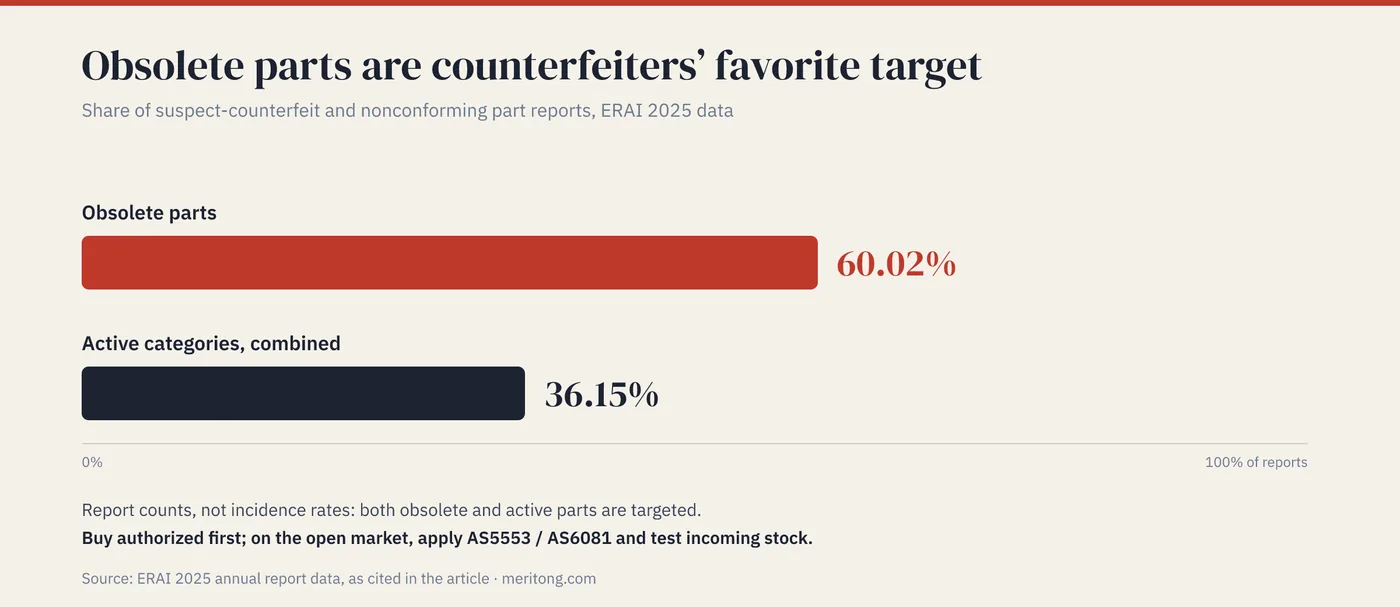
Verification settles which part will work, whereas procurement settles which part arrives, and the two questions are answered in different places. Once you have verified the part, source it carefully, because obsolete parts are counterfeiters' favorite target on the open market. In ERAI's 2025 data, obsolete parts were again the most-reported category, at 60.02% of suspect-counterfeit and nonconforming parts, while the active categories together accounted for 36.15%. Those figures count reports and do not measure incidence, though they show that both obsolete and active parts are targeted.
Buy from the authorized channel or from an authorized aftermarket manufacturer first. Where you must go to the open market, that is the domain the counterfeit-avoidance standards address: AS5553 sets avoidance requirements for buying organizations across the supply chain, while AS6081 targets independent distributors and open-market transactions specifically, and risk-based incoming inspection and testing become essential. The incoming inspection is what connects the part number you verified to the parts that arrive.
FAQ
Is "pin-compatible" the same as "drop-in"?
No. Footprint-compatible means that the package fits the same land pattern, and pin-compatible, also called pin-to-pin, means in addition that the pin assignments match; those two together constitute form and fit. A drop-in matches on function as well: it works in the existing design without hardware or software changes across your voltage, current, temperature, and timing conditions. A part can be pin-compatible and still fail as a drop-in.
Where do I find a legitimate replacement?
Four routes run in descending order of reliability: the same part from an authorized aftermarket manufacturer such as Rochester or via die banking; the manufacturer's own cross-reference/alternate tool; a lifecycle-database "crosses" list; and then independent parametric search platforms. Treat everything below the first tier as a candidate to verify.
If the datasheets match, do I still need to re-test?
For anything critical, the answer is usually yes. Datasheets do not capture every behavior, values shift under real bias and temperature (see the four traps), and a swap in a certified or automotive product can trigger requalification: for automotive use, confirm qualification to the applicable AEC family (AEC-Q100 for ICs) and check your customer's change-control requirements. Verify by measurement in your circuit, and do not settle the question by reading alone.
Are gray-market obsolete parts safe?
Their counterfeit risk is the highest: obsolete parts led ERAI's 2025 reporting at 60.02%. Prefer the authorized channel. Where you cannot, apply the counterfeit-avoidance standards (AS5553/AS6081) and test incoming stock.
What's the difference between a "second source" and a "drop-in"?
A second source is an additional qualified source or supplier for a part. A drop-in replacement describes technical interchangeability, meaning no hardware or firmware changes, irrespective of supplier. The two terms answer different questions: one asks who can ship the part, and the other asks whether the part works where the old one worked. A second-source part may or may not be a drop-in, and a same-supplier drop-in does not create a second source.
Conclusion
A verified replacement removes a single-source dependency, and you now have a proven alternative for the part that could have stopped your line. The trap is to treat "pin-compatible" as the finish line when it marks the starting line. A pin-compatible verdict establishes that two parts share a footprint and a set of pin assignments; a drop-in verdict establishes that one of them behaves as the other did under the conditions your design imposes. Everything described above is the work of getting from the first statement to the second.
For a discontinued part in your own design, that work is what separates a pin-compatible candidate from a verified replacement. That is the kind of hardware-component problem I help with, particularly where China sourcing is involved, and I look at hardware, firmware, and sourcing together; get in touch if such a part is delaying one of your products.
Meritong advises on China sourcing and supply-chain strategy and performs firsthand datasheet reviews, including reviews of Chinese-language OEM documentation. This article is general engineering guidance; verify any replacement against the specific part's datasheet and your own testing.
Typical dependencies by email
Examples from real hardware audits, sent occasionally.
Working through this right now? Free intro call → or write to me →
Is this question on your desk right now?
In the free potential check you tell me the type of components you use. After 30 minutes you know whether an audit is worth it.
Free intro call